
Your building's gatehouse, organised and secure.
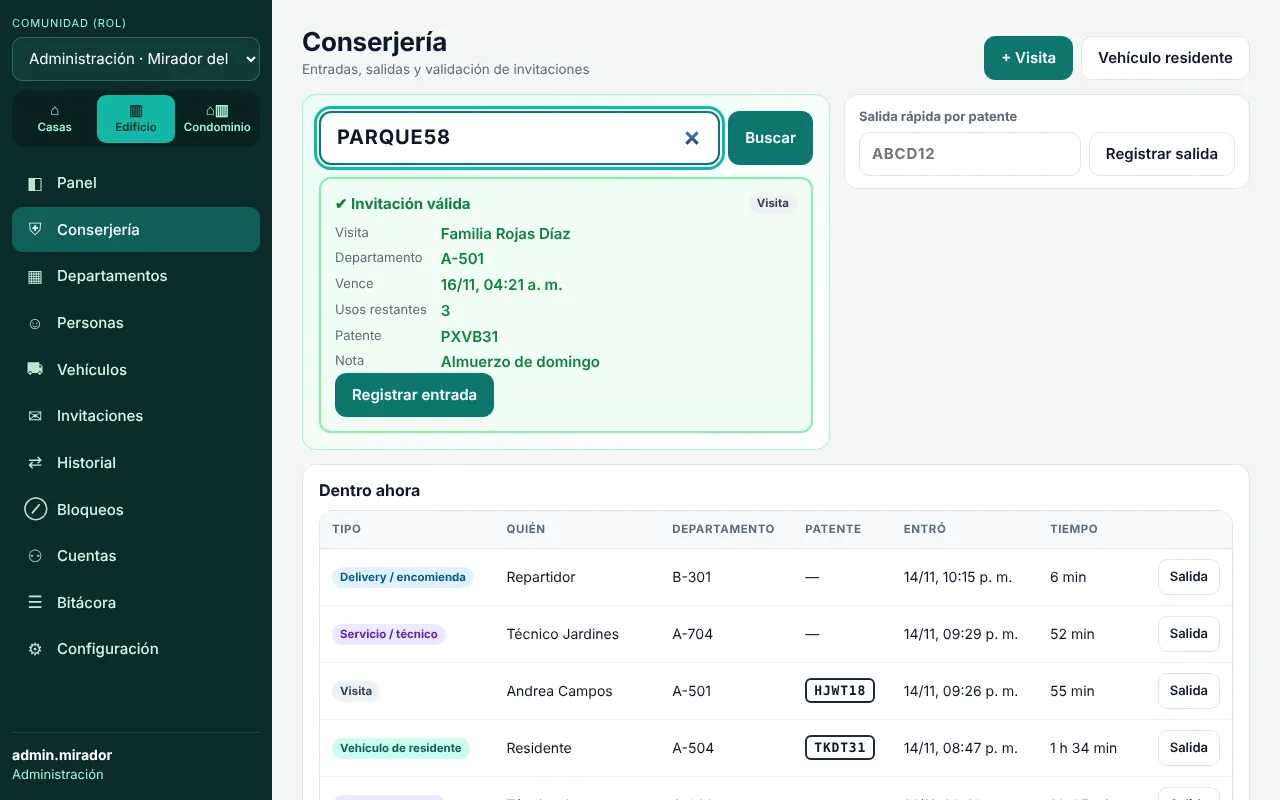
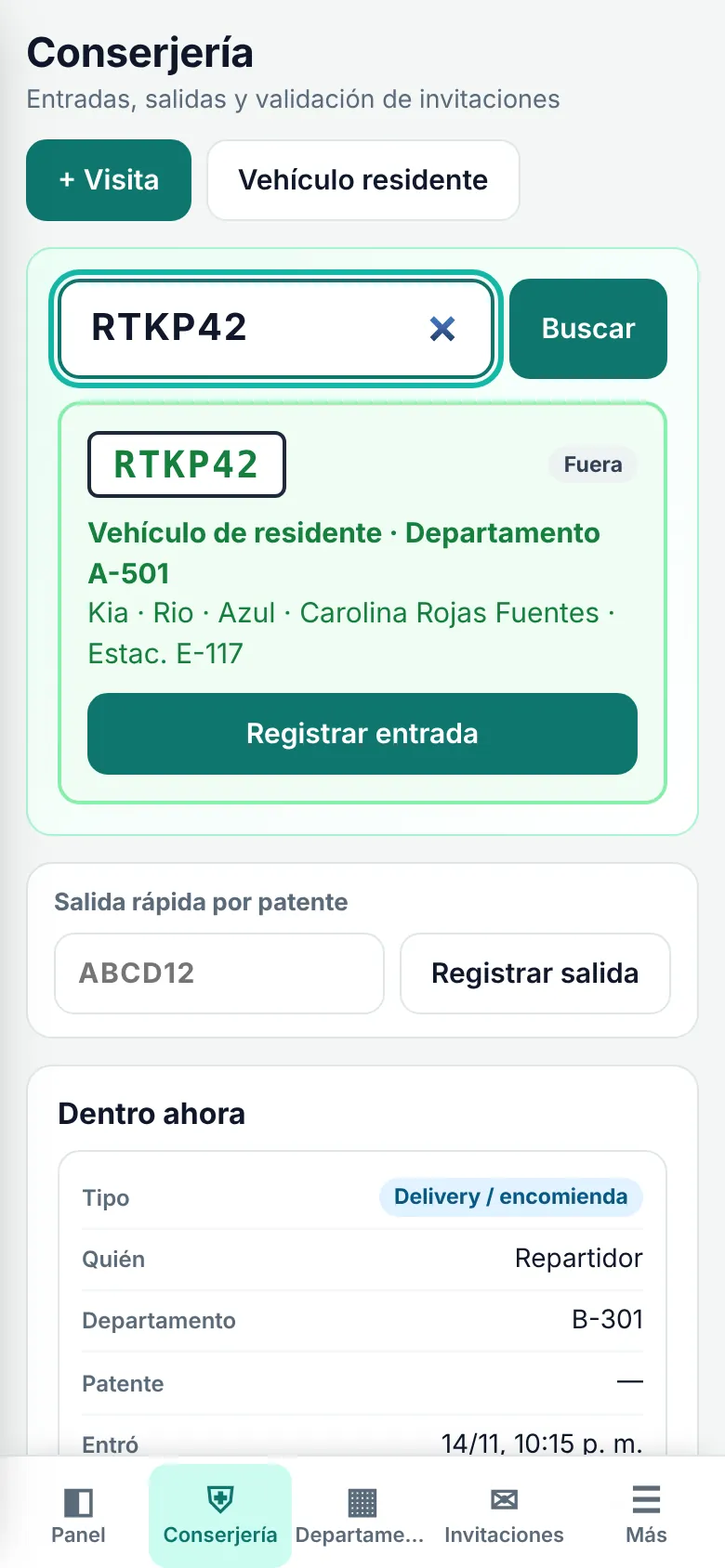
Residents, vehicles, visitors with QR codes and blocklists in one tool. The concierge searches a plate or a code and knows instantly whether to open the gate.
- Houses, buildings and mixed communities
- Works on the concierge's phone
- Spanish, English and Arabic
A paper visitor log protects no one
Without a digital record nobody knows who came in, which unit they visited or who authorised them, and personal data is left in plain sight.
Today, at many gatehouses
- Paper visitor bookNames and ID numbers handwritten in plain sight, impossible to search and never deleted.
- Calls to authoriseEvery visitor means calling the resident, who often doesn't answer. The queue at the gate grows.
- Messy spreadsheetsResidents, tenants and vehicles in separate sheets nobody updates when someone moves.
- Shared loginsOne password for everyone, with no distinction between management, board and concierge.
With WAW Community
- A digital, searchable recordEvery entry and exit is saved with the time, unit and who logged it. Visitor data is deleted automatically when the period ends.
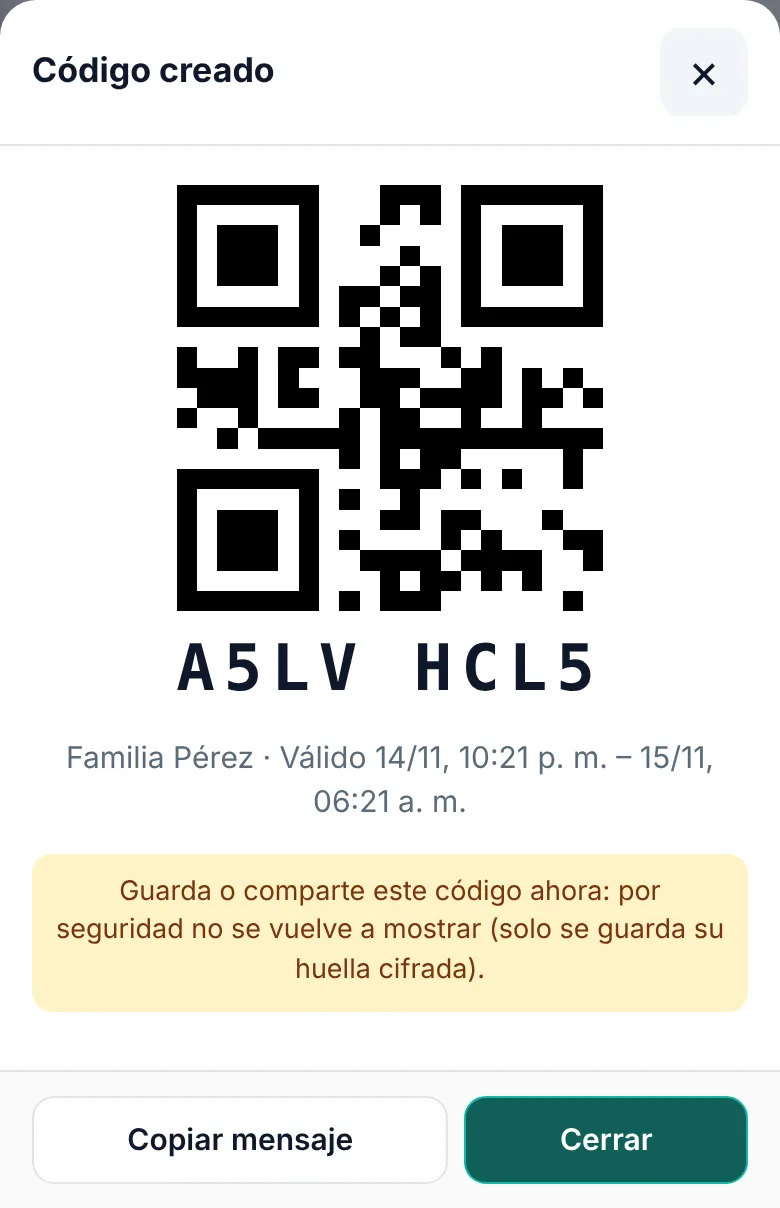
- Invitations with a codeThe resident sends a code or QR to the visitor, and the concierge validates it without calling.
- One record per unitOwners, family, tenants and vehicles on the record of each apartment or house.
- One account and one role per personManagement, board, concierge and residents sign in with their own account and see only what is theirs.
How your community gets started, in 3 steps
Create the community
Choose houses, a building or a condominium, and the country. The tool suggests the time zone, ID documents and data protection framework.
Add units and people
Create every apartment in a tower or every house on a street in one step. Then add owners, family and vehicles.
Hand out the accounts
Each community has its own address, such as worksandworks.com/casas/your-community. You give access to the concierge, the board and residents, each with their role.
Everything that happens in your community, in one place
From the building's structure to the latest visitor, with clear permissions for every person.
- Gatehouse in one search box
- Plate or invitation code: resident, guest or blocked at a glance. Who is inside, live.
- QR invitations
- 8-character codes by date and number of uses for visitors, deliveries, services or events.
- Residents and families
- Owners, tenants, family members and household staff, with minors flagged and who can authorise visitors.
- Vehicles
- Plate, type, colour, parking spot and toll tag. The plate identifies the unit at the gate.
- Blocklist
- By ID or plate, with a reason and an end date. The gatehouse sees the alert before opening.
- Bulk units
- Create every apartment in a tower or every house on a street in one step, with ownership share and notes.
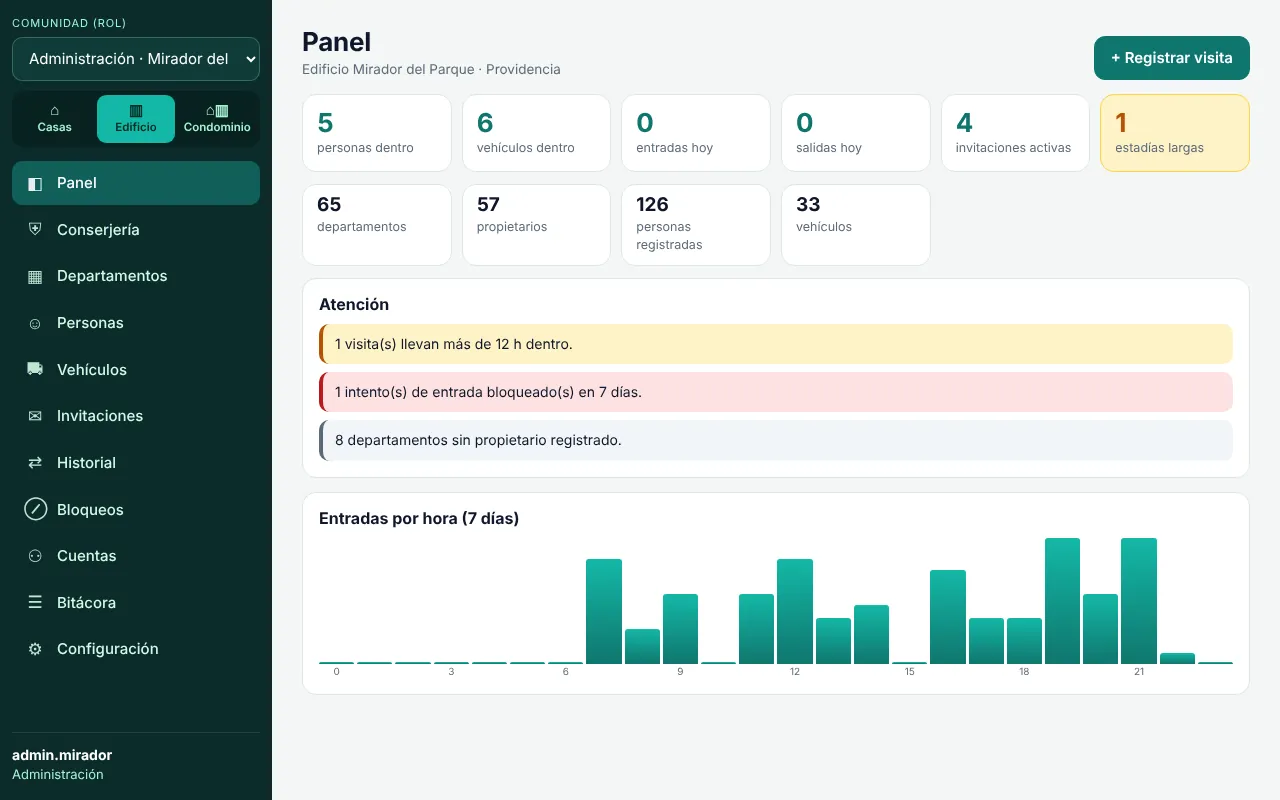
- Dashboard and alerts
- People and vehicles inside, long stays, blocked attempts and units with no registered owner.
- History and audit log
- Entries and exits by date, type and unit, and a verifiable log of every action.
A day at the gatehouse
This is what a normal shift looks like with WAW Community. The times are an example.
- A resident drives outThe concierge types the plate and logs the exit with one tap.
- A delivery arrivesThe company and destination unit are logged. When the courier leaves, the exit is recorded.
- A visitor arrives with an invitationThey show their QR code. The concierge validates it and the entry is linked to the inviting apartment.
- A blocked plate tries to enterThe screen shows the alert and the reason before opening, and the attempt is logged.
- Shift changeThe night concierge sees who is still inside and long stays highlighted in yellow.
Each person sees only what they should
Permissions are enforced by the server, not just the screen: no role can bypass what it isn't allowed to do.
| What they can do | Management | Board | Concierge | Resident |
|---|---|---|---|---|
| Log entries and exits | Yes | View only | Yes | Their unit |
| Create invitations | Yes | No | Validate | Yes |
| People and vehicles | Yes | View only | Masked data | Their unit |
| Blocklist | Yes | View only | Sees the alert | No |
| Accounts, settings and audit log | Yes | View only | No | No |
How to use WAW Community, step by step
From creating the community to the first visitor at the gate. The tool also includes a built-in guided tutorial.
Getting started4 steps
Create the community and set its own address.
- Create the communityIn WAW Community choose «+ New community…», type the name and the type: houses, building or condominium.
- Check its addressIt is created from the name: worksandworks.com/casas/edificio-los-alamos. You can change it in Settings.
- Configure the gatehouseIn Settings you decide whether each visitor must show ID, how many hours count as a long stay and whether residents can create invitations.
- Set up privacyState who the data controller is, the email for data requests, the privacy notice and how many days visitor data is kept.
Towers, streets and units3 steps
Set up the structure once and use it forever.
- Create sectorsTowers with floors (building), streets or lanes (houses) or phases (condominium).
- Create units in bulk«Create in bulk» generates apartments per floor (101, 102…) or houses by number range, with an optional prefix.
- Complete each unitType (house, apartment, shop, office or storage), ownership share and internal notes the concierge can't see.
People and vehicles3 steps
Who lives in each unit and with which vehicles.
- Register the peopleOwner, tenant, resident, family member or household staff. Flag minors and who can authorise visitors.
- Protected dataID, phone and email are stored encrypted. On screen they appear masked; revealing a full value is recorded in the audit log.
- Add the vehiclesPlate, type, make, model, colour, parking spot and toll tag. At the gate the plate identifies the unit instantly.
Gatehouse3 steps
One search box for everything that arrives at the gate.
- Search by plate or codeType the plate or invitation code (or scan its QR): you'll see whether it's a resident, has a valid invitation or is blocked.
- Log the entryVisitor, delivery or parcel, technician, resident vehicle or resident on foot, with the destination unit.
- Who is insideLive list with entry time. Long stays are highlighted in yellow. «Exit» with one tap or quick exit by plate.
Invitations3 steps
Visitors who arrive without calling the concierge.
- Create the code8 characters with a QR, valid by dates and number of uses, for a visitor, delivery, service or event.
- Share itThe resident sends it by WhatsApp or email. At the gate it is validated and one use is deducted.
- Revoke it any timeA revoked or used-up code stops working immediately.
Accounts and roles3 steps
Each person sees only what they should.
- Add an accountWith their email and role. If the person has no account, type their name: it is created with a temporary password shown only once.
- Choose the roleManagement (everything), Board (read-only), Concierge (gatehouse and masked data) or Resident (their unit only).
- Change or remove access«Role» and «Remove» buttons. Whoever created the community is always management, and nobody can remove themselves.
Blocklist, history and audit log3 steps
Control and traceability of everything.
- Block accessBy ID or plate, with a reason and an end date. The gatehouse sees the alert and the attempt is logged.
- HistoryEntries and exits by date, type and unit. Residents see only their own home's.
- Chained audit logEach action includes the fingerprint of the previous one. «Verify integrity» detects any change to the log.
Ready to use in other countries
Each community chooses its country. The tool suggests the time zone, the ID documents it validates, the phone format and the data protection framework. Everything can be adjusted in Settings.
- ID documentsRUT, DNI, NIE, CPF, CURP, RFC, national ID card, Emirates ID, Iqama and passport, with check-digit validation when the document has one.
- International phone numbersThey are saved with the country code, for example +56 or +971.
- Local timeEntries, exits and long stays are calculated in the community's time zone.
- Data protectionA suggested privacy notice for each legal framework: Chile's Law 21.719, GDPR, Brazil's LGPD, the UAE law and others.
The tool and this page are available in Spanish, English and Arabic.
Personal data that is truly protected
- AES-256-GCM encryption for IDs, phone numbers and emails; search uses a blind index.
- Masked data the concierge sees only what's needed; revealing a full value is logged.
- Automatic deletion visitor data is anonymised when the period set by management ends.
- Individuals' rights every resident can request a copy or erasure of their data.
- Chained audit log every action stores the fingerprint of the previous one and its integrity can be verified.
- Secure access own address, temporary password changed on first sign-in, attempt limits and two-step verification.
Who it is for
- Apartment buildingsTowers, floors, parking spaces and storage units.
- Gated communities and housing estatesStreets, lanes or phases, with a gatehouse at the entrance.
- Property management companiesSeveral communities from one account.
- Concierge and security companiesShifts with their own account, without seeing more data than needed.
Frequently asked questions
Does it work for houses, buildings and mixed communities?
Yes. You choose the type (houses, building or condominium) and the tool adapts its wording: towers or streets, apartments or houses. You can change it later without losing data.
How does each person sign in?
Each community has its own address, for example worksandworks.com/casas/edificio-los-alamos. Management creates the accounts with a temporary password that the person changes on first sign-in. Two-step verification can also be required.
What does the concierge see?
Only what the gatehouse needs: search by plate or code, log entries and exits, and see personal data masked (for example, the last 3 digits of an ID). Management decides whether residents' phone numbers are visible.
What can the board do?
The Board role sees everything management sees (units, people, history, audit log) but cannot change anything. The server rejects any change from that role.
How do invitations work?
Management or the resident creates a 8-character code with a QR, valid for given dates and a number of uses. At the gate the code is typed or scanned and the visit is logged against its unit.
How is personal data protected?
IDs, phone numbers and emails are stored encrypted (AES-256-GCM) and searched with a blind index. Visitor data is anonymised automatically when the period set by management ends, and every resident can request a copy or erasure of their data. It is designed for Chile's Law 21.719, the GDPR and the UAE data protection law.
Does it work outside Chile?
Yes. Each community chooses its country and the tool suggests the time zone, the identity documents it validates (RUT, DNI, CPF, CURP, NIE, Emirates ID and others), the international phone format and the data protection framework, for example GDPR, LGPD or the UAE law. Everything can be adjusted in Settings.
Does it include service charges and billing?
Not yet. Today WAW Community covers residents, vehicles, gatehouse, invitations, blocklists and accounts. If you need service charges, tell us about your case in the form.
Does it work on the concierge's phone?
Yes. On phones it has a bottom bar with the main sections; on tablets and desktops, a side menu. It is also available in English and Arabic.
How much does it cost?
It depends on the number of units in your community. Request a quote in the form and we will reply with a price for your case.
Can I try it before signing up?
Yes. The public demo is the real tool with a sample building: you can view it as management, board, concierge or resident. Nothing is saved on the server.
What do I need to get started?
Just a browser on the concierge's computer, tablet or phone. No software to install and no equipment to buy.
Can I export my data?
Yes. Management can export the entry and exit history, and every resident can request a copy of their personal data.
Works better alongside other tools
Each solution stands on its own, but they share sign-in, security and the same way of working.
Try it today with a sample building
Open the demo as management, concierge or resident. When you want to use it in your community, request a quote.
Let's talk about your community
Tell us how many units your community has and we'll show you WAW Community working with your case. No commitment.